 Flicky
Make them see every click.
Flicky swaps your pointer for a big, animated cursor that taps every time you click, so nobody on your call or in your recording loses track of you again.
Wherever you share your screen, they see it*
*When you share or record a whole display. A single shared window never includes it. Why
Only the look changes.
Flicky draws on top of everything and lets every click pass straight through. Select text, drag windows, scroll, use your shortcuts: it all works exactly as before, now with a tap your viewers can see.
- Left, right and double clicks each look different
- Over text and window edges it shows a matching I-beam or resize shape
- The system pointer always comes back when Flicky quits, even if it crashes
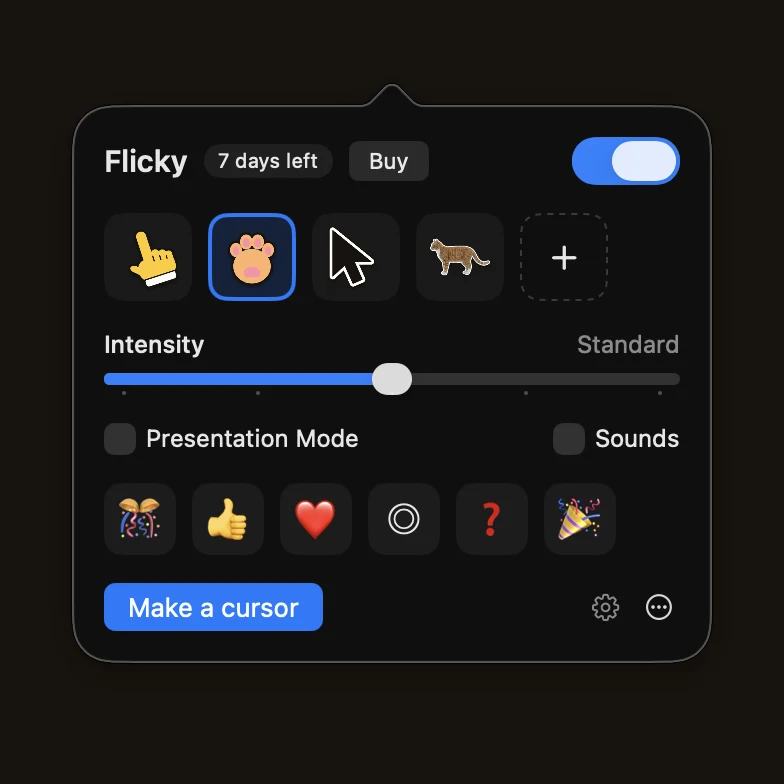
Five intensity stops
Pick how loud the whole thing is. Standard is the default.
Small app, proper presenter tools
Everything you need to be followed on a call, nothing that slows your Mac down.
One slider from shy to loud
Five stops, Subtle to Loud, set the size, the squash, the flash and the lean in one move. Client call or lecture hall, it takes a second.
Presentation Mode
Clicks show a tap but do not reach the app underneath, so you can point at links and slides without opening anything. The keyboard still works; Esc twice gets you out.
Spotlight
Hold a shortcut and the screen dims around your pointer. Double-tap it to keep it on. Scroll to make the circle bigger or smaller.
Six reactions
Confetti, thumbs up, heart, question mark, a party popper and “look here” rings, fired at your pointer from a shortcut.
On when the call starts
Optional: Flicky turns itself on while an app uses your camera or microphone, and off when the call ends. It only reads whether they are in use.
Tap sounds
Eight short sounds, or your own. Off by default, with a volume that ignores the system volume and a mute in the menu bar.
Every display
Follows you across all your screens, at any scale, including displays you plug in mid-call.
Lives in the menu bar
One click or one shortcut to switch it on. Every shortcut can be changed, and Flicky tells you if one is taken.
Default shortcuts: ⌃⌥C cursor on or off, ⌃⌥P Presentation Mode, ⌃⌥S spotlight, ⌃⌥1 to ⌃⌥6 reactions.
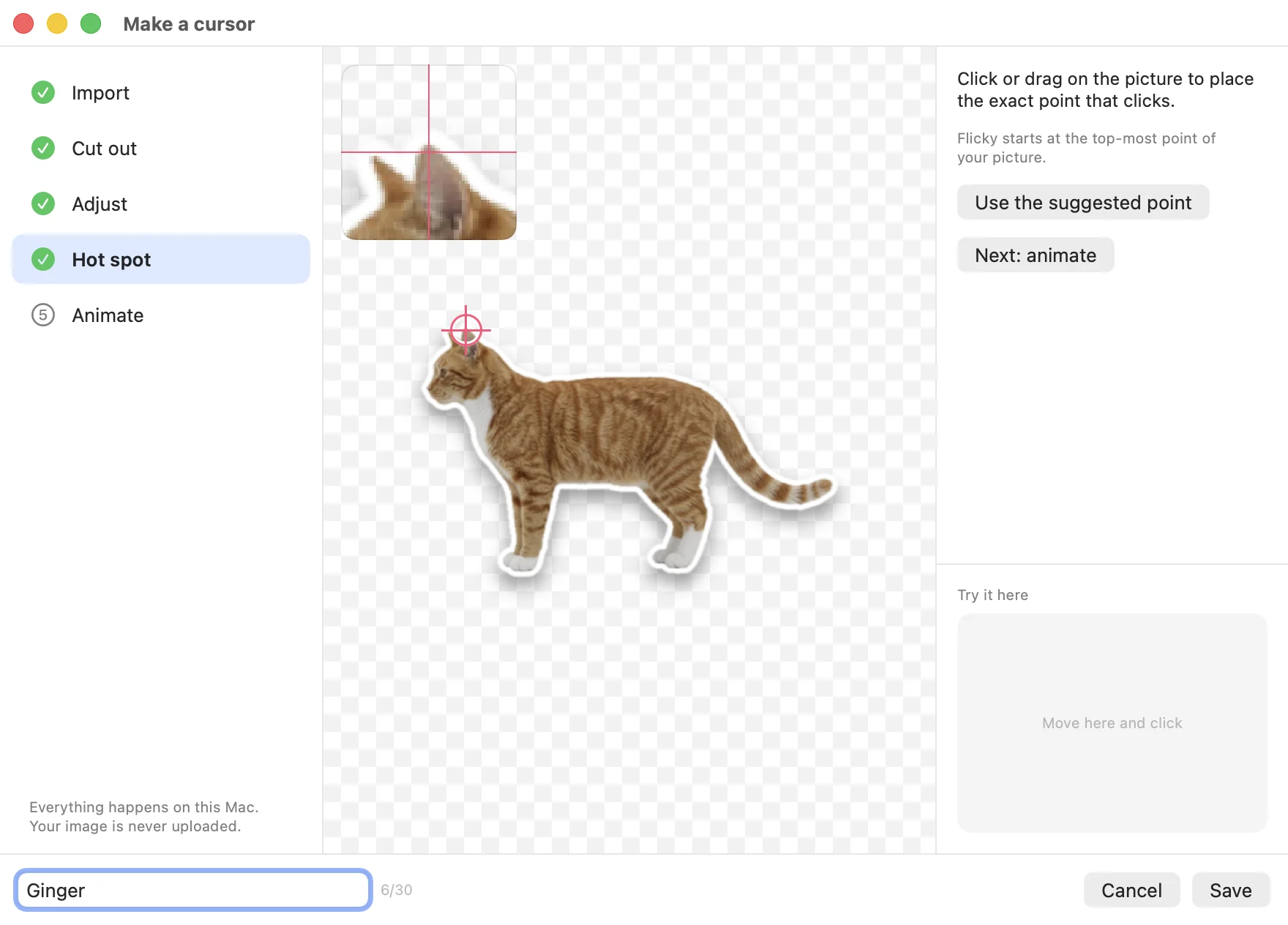
Your cat. Your face. Your logo. Now it clicks.
Drop in any photo and Flicky turns it into a cursor that taps, in under a minute. The cut-out happens on your Mac; nothing is uploaded.
- Import. Drag, paste or pick a PNG, JPEG, HEIC, TIFF, WebP or GIF.
- Cut out. The subject is lifted from its background automatically.
- Adjust. Crop, rotate, flip, add a sticker outline and a shadow.
- Set the hot spot. Drag a crosshair, with a zoomed loupe, to the exact pixel that clicks.
- Animate. Squash, Poke, Wiggle, Pulse or Stamp, and try it on the test pad.
Keep up to 50, and share any of them as a .cursorpack file.
Hands, paws, arrows and a few props
Every style has its own tap pose. Recolour any of them, add an outline or a shadow, or mirror it for your left hand.
 Pointing handHands
 Cartoon gloveHands
 Pixel handHands
 Cat pawPaws
 Dog pawPaws
 Bear pawPaws
 Big classic arrowArrows
 Neon arrowArrows
 Chalk arrowArrows
 Magic wandObjects
 Laser dotObjects
 PencilObjects
Light enough to leave on all day.
A native Swift app in your menu bar. No account, no cloud, nothing to sign in to. It does nothing at all while your pointer rests.
- One permission, Accessibility, explained before it is asked for
- Signed with an Apple Developer ID and notarized by Apple
- Updates itself, and never while your cursor is on
- Respects Reduce Motion and Increase Contrast
Pay once. Keep it.
Try everything free for 7 days. Launch prices, with every 1.x update included.
Solo
- All 12 cursor styles
- Custom Cursor Studio
- Spotlight, reactions and Presentation Mode
- Every 1.x update
- License key by email
Duo
- All 12 cursor styles
- Custom Cursor Studio
- Spotlight, reactions and Presentation Mode
- Every 1.x update
- License key by email
Team
- All 12 cursor styles
- Custom Cursor Studio
- Spotlight, reactions and Presentation Mode
- Every 1.x update
- License key by email
Questions
What does Flicky do?
Flicky swaps your Mac pointer for a big, animated cursor that visibly taps every time you click, with a flash where the click landed. People watching your call or recording can always find your pointer and see exactly when and where you clicked. It lives in the menu bar and switches on and off with one shortcut.
Does it change how clicking works?
No. Only the look changes: clicks, drags, text selection, scrolling and shortcuts behave exactly as before. The one exception is Presentation Mode, which you switch on yourself: then clicks show a tap but do not reach the app underneath, so you can point at slides and links safely.
Will people on my call see it?
Yes, when you share or record a whole display: Zoom, Google Meet, Microsoft Teams, Slack huddles, Loom, OBS and QuickTime all pick it up. It cannot appear when you share a single window, because the window being shared is all the call app sends. Flicky reminds you of this the first time it is on during a call.
Can they hear the taps?
Sounds are off until you turn them on. When they are on, the tap plays as normal computer audio, so viewers hear it if you share your computer's sound in the call. There are eight built-in sounds, or import your own.
Which Macs does it run on?
Any Mac on macOS 14 Sonoma or later, Apple silicon and Intel. It is one universal app.
What permission does it need?
One: Accessibility, so it can follow your pointer and see clicks. Flicky never reads what you type, and nothing about your screen leaves your Mac. It does not ask for screen recording, camera or microphone access.
Is the photo I turn into a cursor uploaded anywhere?
No. The Custom Cursor Studio cuts the subject out of your photo with macOS's own Vision framework, on your Mac. Your images and cursors stay in Flicky's folder on your Mac.
Does it work on more than one display?
Yes. The cursor follows you across every display, including displays plugged in or unplugged while it is on.
What about Figma, Miro or Canva?
People inside the same file see the tool's own multiplayer cursor, which Flicky cannot change. People watching your screen share see your Flicky cursor as usual.
Is there a free trial?
Yes: 7 days with every feature, no card and no account. It starts when you finish the welcome steps. After that the cursor stays off until you add a licence; your settings and custom cursors are kept.
How does buying work?
One payment, no subscription. Checkout is run by Dodo Payments, which handles sales tax and sends your receipt with a licence key. Paste the key into Flicky (or open the link in the email) and it works offline from then on. Solo covers 1 Mac, Duo 2 and Team 5, and you can move a seat to another Mac at any time.
Can I get a refund?
Yes. Within 14 days of buying, email hello@getflicky.app and you get a full refund.
Why is it not on the Mac App Store?
Drawing over every app and hiding the system pointer is not something App Store apps are allowed to do. Flicky is signed with an Apple Developer ID and notarized by Apple, so macOS checks it before it opens, and it updates itself from inside the app.
Will it work on a company Mac?
Usually. Some managed Macs do not let you turn on Accessibility access for new apps. If yours is one, Flicky says so on the permission screen, and your IT team can allow it.
Do updates cost extra?
No. Every 1.x update is included. Flicky checks once a day and never installs an update while your cursor is on.
Something else? Ask us or read the help center.
Give your pointer a personality.
Free for 7 days. Then $4.99 once.
macOS 14 or later. Apple silicon and Intel. Toggle with ⌃⌥C.